

67Client
67Client is a DonutSMP-focused Minecraft client featuring combat, visual enhancements, and specialised server utility modules.
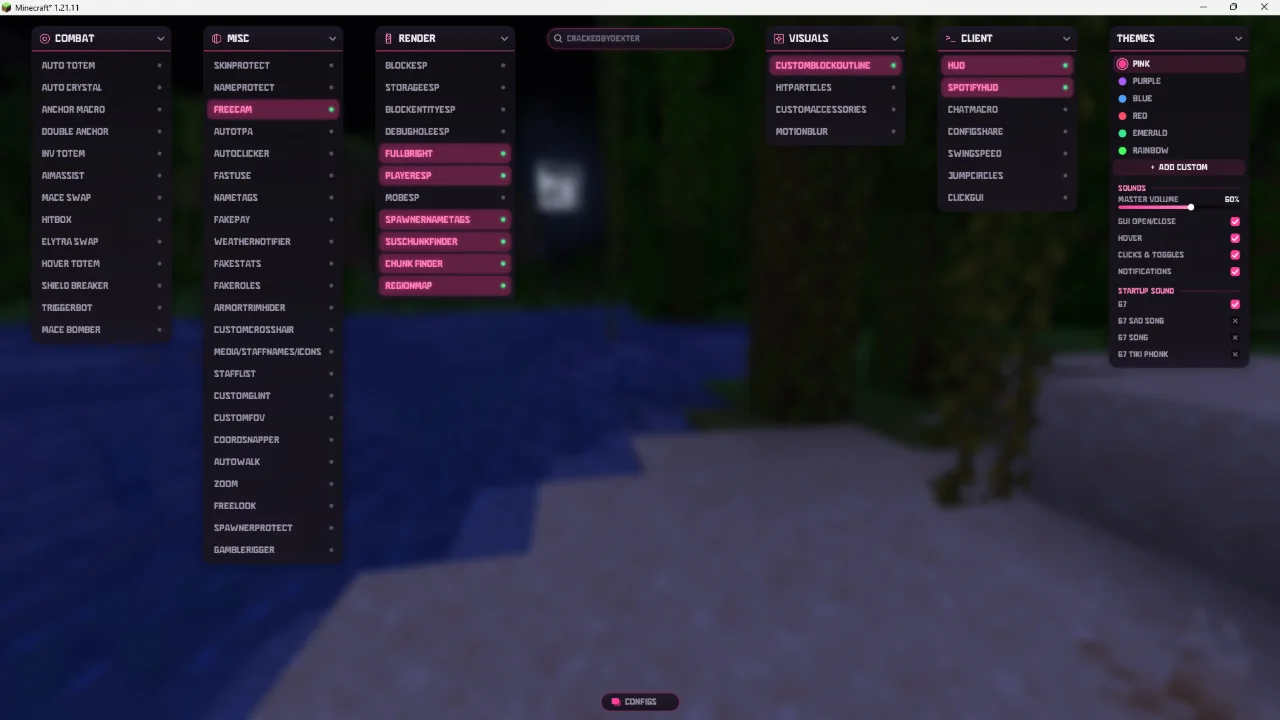
About 67Client
67Client is a Minecraft utility client specifically designed for DonutSMP players. Combining combat enhancements, visual modules, and specialised server utilities, it provides an extensive toolkit for players looking to improve their gameplay experience.
With over 50 modules across multiple categories, 67Client offers features for combat, rendering, visuals, and general utilities. It includes specialised DonutSMP tools such as RegionMap, StaffList, and Chunk Finder, making it particularly useful for players exploring, basehunting, and competing on the server.
The client features two customisable GUI layouts, allowing users to choose between a unified panel or individual category dropdowns. Keybinds, HUD arrangements, and configurations can also be customised and saved.
Key Features
- Combat Modules – A collection of combat enhancements designed for different PvP situations.
- DonutSMP Utilities – Includes RegionMap, StaffList, and Chunk Finder for specialised server functionality.
- Visual Enhancements – Rendering and visual modules to improve awareness and customisation.
- Dual GUI Layouts – Choose between Panel and Dropdown interfaces.
- Custom Configurations – Save keybinds, HUD layouts, and personal settings.
- 52 Modules – Extensive functionality across Combat, Render, Visuals, Misc, and Client categories.
67Client is ideal for DonutSMP players looking for an all-in-one Minecraft client with specialised server utilities, combat features, and extensive customisation.
Supported Version: Minecraft 1.21.11 (Fabric).
Features
- 52 Combat, Visual & Utility Modules
- DonutSMP RegionMap & Chunk Finder
- Customizable Dual GUI System
How to install 67Client
5 steps. Takes about 3 minutes.
-
Step 1: Download 67Client
Choose the file that matches Minecraft 1.21.11. Only download from the buttons below.
-
Step 2: Install Fabric for Minecraft 1.21.11
67Client runs on the Fabric mod loader. Get the official installer from fabricmc.net/use/installer, run it, pick Minecraft 1.21.11 and press Install.
Already have Fabric for this version? Skip this step.
-
Step 3: Open your mods folder
Windows%appdata%\.minecraft\modsPress Win + R, paste this, press Enter.macOS~/Library/Application Support/minecraft/modsIn Finder press Cmd + Shift + G and paste this.Linux~/.minecraft/modsOpen it in your file manager or terminal.If there is no
modsfolder yet, create one with exactly that name. -
Step 4: Move the files into the mods folder
Drag the
.jarfile you downloaded into themodsfolder. Do not unzip it.Remove older versions of 67Client from the folder so they do not clash.
-
Step 5: Launch Minecraft with the Fabric profile
Open the Minecraft Launcher, pick the Fabric profile in the bottom-left dropdown and press Play.
Most clients open their menu with Right Shift. Check the description above if it is different.
Stuck? See the troubleshooting guide.